
Short description
With the filters in the Sourcing Sheet you narrow down your profitable deals in seconds — by purchase source, category, marketplace, rating and price ranges. Filter combinations can be saved as templates per user.Step-by-step guide
Step 1: Open the filter flyout
→ Open directly in the app: app.arbitrageone.de/productsheets At the top, next to the Filter templates, click the filter icon to expand the flyout.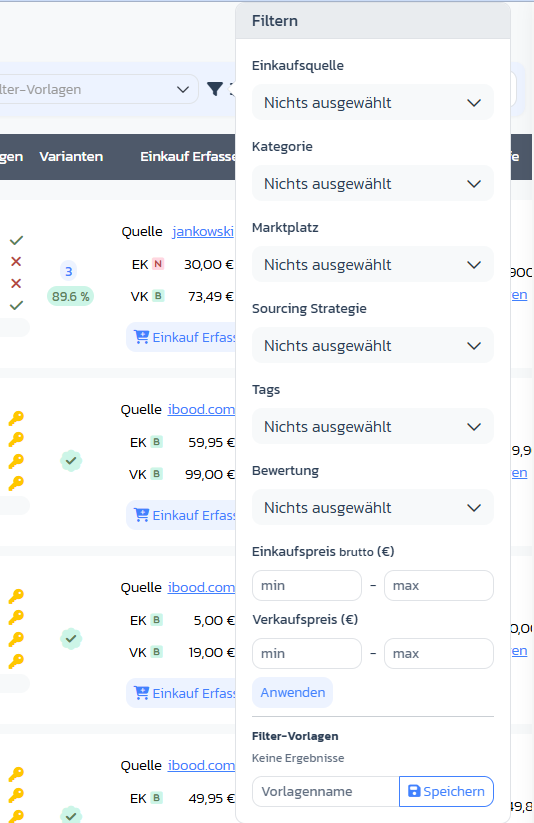
Step 2: Use multi-select filters
The following dropdowns allow multi-select with live search:- Purchase source: source of the deal (Rossmann, Müller, Idealo …)
- Category: Amazon category (Website Display Group)
- Marketplace: target marketplace (DE, FR, IT, ES, UK …)
- Sourcing strategy: strategy assignment (e.g. Online Arbitrage, Retail Arbitrage)
- Tags: your own tags
- Rating: 1 (Bad) to 5 (Good)
Step 3: Filter price ranges
- Purchase price gross (€): min/max range for the purchase price
- Selling price (€): min/max range for the selling price
Step 4: Apply filters
Click Apply — the table updates with the active filters.Step 5: Save filter as a template
Under Filter templates enter a template name and click Save. Saved templates can be recalled at the top next to the filter icon.Notes on ROI and Margin
- ROI, Margin and Breakeven are shown per row as coloured badges (traffic-light system based on your thresholds in Settings → Calculation).