
Short description
CoG (Cost of Goods) is the purchase price ArbitrageOne uses to calculate your profit. By default the system uses the values from your recorded purchases. For SKUs without a purchase entry — e.g. from old stock or Sellerboard imports — you can store the CoG here manually.Page layout
Notice at the top
By default, calculation uses the purchase prices for which a purchase has been recorded in A1. If no purchase exists for an SKU, the values stored here are used as the purchase price.
Table
Buttons in the top right
- Add — manual entry per SKU
- Batch Upload — upload CSV with SKU → price
- Sellerboard Import — tutorial link for migration
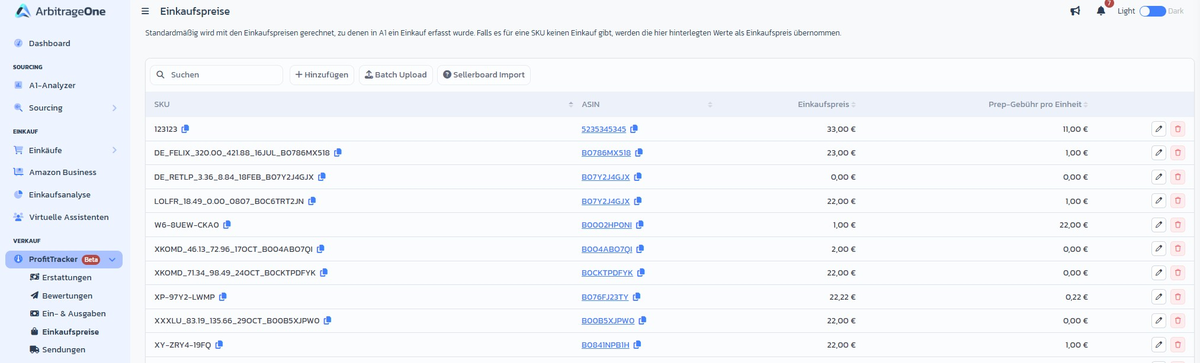
Step-by-step: Set a single CoG
Step 1: Find the SKU
→ Open directly in the app: app.arbitrageone.de/cog Use the DataTable search field at the top left to find the SKU.Step 2: Add
Click Add (or the edit button in the row) and enter SKU, ASIN, purchase price (net) and prep fee (net). Via + Add row you can enter multiple SKUs in one go.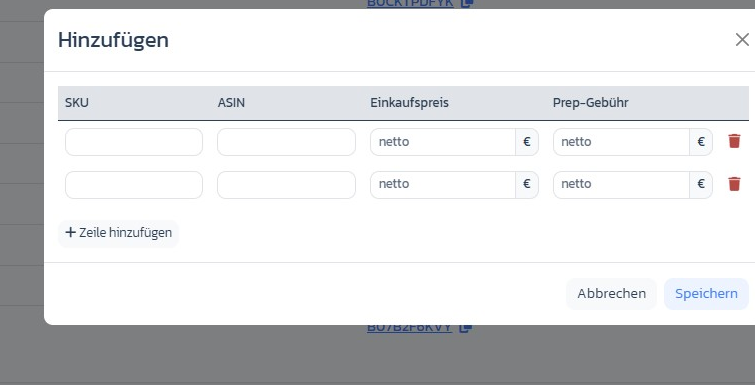
Step 3: Save
Saving applies the value immediately to all future profit calculations.Step-by-step: Batch upload
Step 1: Prepare CSV
Create a CSV with the columnsseller_sku;cost. The decimal separator is a dot (e.g. 12.50).
Step 2: Upload the file
Click Batch Upload and choose your file. You’ll see a preview before the values are applied.Step 3: Apply
Confirm — existing entries are overwritten, new ones are created.Important notes
- Values from Record Purchase take priority over manually stored CoGs. Recorded purchases don’t overwrite the manual value, they are used directly.
- CoG is stored in the currency of your home marketplace.
- Sellerboard migration: export the SKU/CoG list there as CSV and use the batch upload.