
Short description
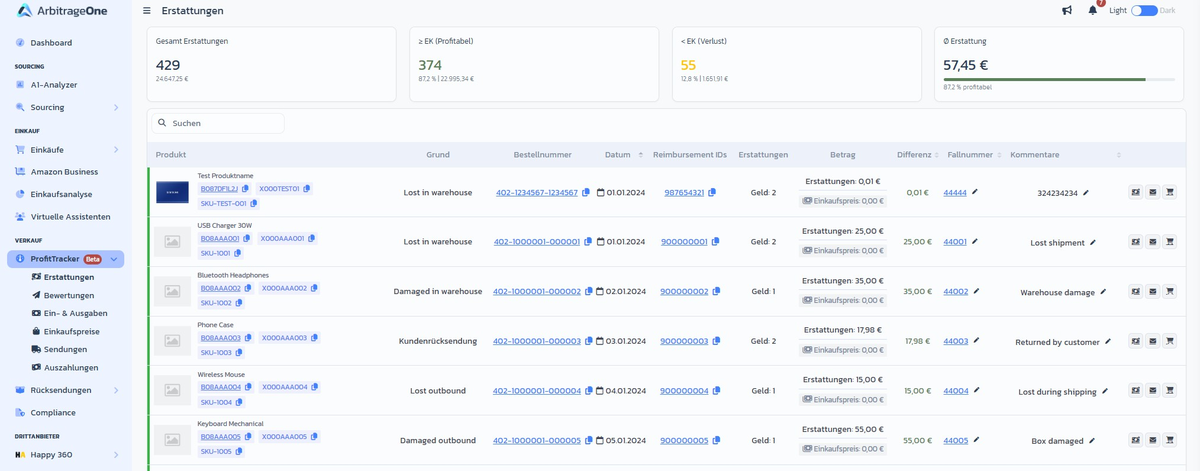
In the Reimbursements section of ProfitTracker you see every Amazon reimbursement — e.g. for lost or damaged warehouse stock, miscalculated FBA fees or customer returns. At a glance you can tell which reimbursements were profitable and on which ones you lost money.Page layout
KPI cards at the top
- Total reimbursements — count + total amount
- ≥ Cost (Profitable) — count, share in % and amount
- < Cost (Loss) — count, share in % and amount
- Ø Reimbursement — average amount per reimbursement
Table
Step-by-step: Track lost goods
Step 1: Set filter
→ Open directly in the app: app.arbitrageone.de/reimbursements Search via the DataTable field forLost or an ASIN.
Step 2: Check the discrepancy
If the Discrepancy column is red, Amazon reimbursed less than your CoG. Click Dispute / Request top-up (link on the entry) and follow through to the Amazon form.Step 3: Store the case number
Click the pencil icon next to Case number and enter Amazon’s case number. That way you can find the case later.Step 4: Add a comment
In the Comments field record what you wrote to Amazon or what deadline you set yourself.Important notes
- A reimbursement can contain Cash (payout) and Inventory (goods back to the warehouse) at the same time.
- A loss often arises when Amazon applies the default reimbursement amount instead of your actual CoG. In that case it’s worth filing a dispute with a purchase invoice.
- Before filing a request, it’s worth checking Amazon Inventory Reimbursement → Cost Management. There you see per FNSKU which CoGs Amazon has already accepted — so you know in advance which value to bring into the dispute.