> ## Documentation Index
> Fetch the complete documentation index at: https://docs.arbitrageone.de/llms.txt
> Use this file to discover all available pages before exploring further.
# How do I automate my Amazon payouts?
> Automate Amazon payouts per marketplace and interval, with a payout history view.
## Short description
With *Automatic Payouts*, ArbitrageOne regularly requests a payout of your Amazon balance on your behalf. That way your cash flow stays steady without you having to trigger it manually every time. You also see your historical payout history as a chart and table.
## Page layout
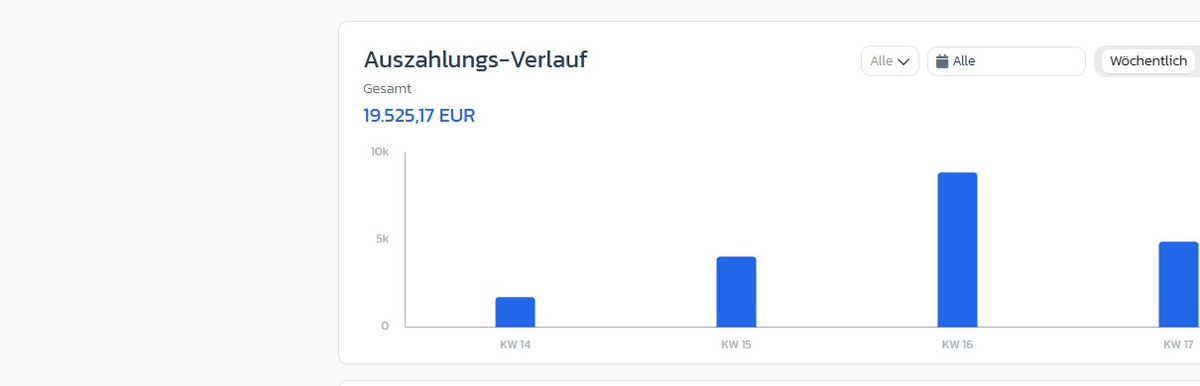
### History chart
Bar chart of your payouts per calendar week with filters for marketplace, time range and grouping (Weekly / Monthly).
 ### Settings
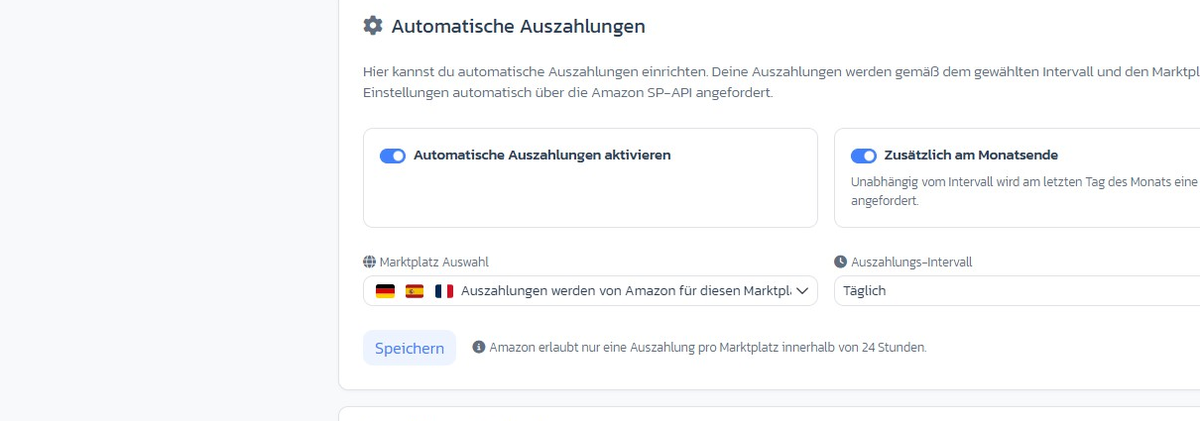
* **Enable automatic payouts** — master toggle
* **Additionally at month-end** — requests a payout on the last day of the month regardless of the interval
* **Marketplace selection** — multi-select (only participating marketplaces selectable)
* **Payout interval** — daily / every 2, 3, 4, 7, 10, 14 days
### Settings
* **Enable automatic payouts** — master toggle
* **Additionally at month-end** — requests a payout on the last day of the month regardless of the interval
* **Marketplace selection** — multi-select (only participating marketplaces selectable)
* **Payout interval** — daily / every 2, 3, 4, 7, 10, 14 days
 ### History table
Per entry: transfer date, period, amount, account, status (*Successful*, *Failed*, *Pending*, *In progress*).
### History table
Per entry: transfer date, period, amount, account, status (*Successful*, *Failed*, *Pending*, *In progress*).
 ### Payout log
All automatic attempts with date, marketplace and status — even if no payout actually went out.
## Step-by-step: Set up automatic payouts
### Step 1: Enable
→ Open directly in the app: [app.arbitrageone.de/payouts](https://app.arbitrageone.de/payouts)
Switch the **Enable automatic payouts** toggle on.
### Step 2: Choose marketplaces
Select all marketplaces for which ArbitrageOne should automatically request payouts.
### Step 3: Set interval and minimum amount
Choose e.g. **Every 7 days** and set a **minimum amount** (e.g. €100) to avoid micro-payouts.
### Step 4: Enable month-end (optional)
Enable **Additionally at month-end** so your accounting has a clear cut-off per month.
### Step 5: Save
Click *Save*. From now on the cron job runs in the background.
## Important notes
* **Amazon allows only one payout per marketplace within 24 hours.** More frequent attempts are rejected.
* A payout can be rejected by Amazon for various reasons (e.g. account hold, reserve). Status *Failed* in the log shows the reason.
* Not all marketplaces support on-demand payouts. Unsupported options are greyed out.
## Common issues
**Issue:** "Status shows *Failed* permanently."
**Solution:** Open the entry in the log — typical reasons are a too-high reserve amount or an already running payout attempt within the 24-hour lock.
**Issue:** "Payout didn't come through despite being enabled."
**Solution:** Check the minimum amount, the selected marketplaces and whether your Amazon account is on hold.
### Payout log
All automatic attempts with date, marketplace and status — even if no payout actually went out.
## Step-by-step: Set up automatic payouts
### Step 1: Enable
→ Open directly in the app: [app.arbitrageone.de/payouts](https://app.arbitrageone.de/payouts)
Switch the **Enable automatic payouts** toggle on.
### Step 2: Choose marketplaces
Select all marketplaces for which ArbitrageOne should automatically request payouts.
### Step 3: Set interval and minimum amount
Choose e.g. **Every 7 days** and set a **minimum amount** (e.g. €100) to avoid micro-payouts.
### Step 4: Enable month-end (optional)
Enable **Additionally at month-end** so your accounting has a clear cut-off per month.
### Step 5: Save
Click *Save*. From now on the cron job runs in the background.
## Important notes
* **Amazon allows only one payout per marketplace within 24 hours.** More frequent attempts are rejected.
* A payout can be rejected by Amazon for various reasons (e.g. account hold, reserve). Status *Failed* in the log shows the reason.
* Not all marketplaces support on-demand payouts. Unsupported options are greyed out.
## Common issues
**Issue:** "Status shows *Failed* permanently."
**Solution:** Open the entry in the log — typical reasons are a too-high reserve amount or an already running payout attempt within the 24-hour lock.
**Issue:** "Payout didn't come through despite being enabled."
**Solution:** Check the minimum amount, the selected marketplaces and whether your Amazon account is on hold.