> ## Documentation Index
> Fetch the complete documentation index at: https://docs.arbitrageone.de/llms.txt
> Use this file to discover all available pages before exploring further.
# How do I enable automatic review requests?
> Configure ArbitrageOne to send automatic *Request a Review* solicitations to Amazon.
## Short description
With *Review requests*, ArbitrageOne uses Amazon's official *Request a Review* button automatically — you set the rules once and ArbitrageOne sends a request to Amazon for every qualifying order from that point on. Amazon then handles the email to the customer.
## Page layout
### KPI cards at the top
* **Review requests** — status (Active / Inactive)
* **Requests sent 30d**
* **Requests sent 90d**
 ### Notice (required reading)
A grey alert block reminds you that the emails sent by Amazon can be considered advertising — relevant for the legal assessment in DE/AT.
### Notice (required reading)
A grey alert block reminds you that the emails sent by Amazon can be considered advertising — relevant for the legal assessment in DE/AT.
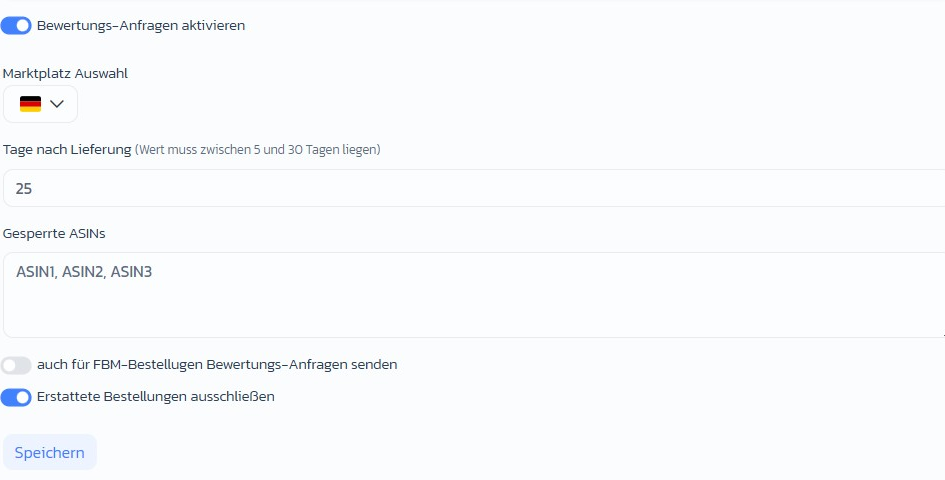
 ### Configuration
* **Enable review requests** — master toggle
* **Marketplace selection** — multi-select via country flags
* **Days after delivery** — waiting time before the request is sent (5–30 days)
* **Blocked ASINs** — comma-separated list, e.g. for brands with review blocks or complaint-prone products
* **Also send review requests for FBM orders** — toggle
* **Exclude refunded orders** — toggle
### Configuration
* **Enable review requests** — master toggle
* **Marketplace selection** — multi-select via country flags
* **Days after delivery** — waiting time before the request is sent (5–30 days)
* **Blocked ASINs** — comma-separated list, e.g. for brands with review blocks or complaint-prone products
* **Also send review requests for FBM orders** — toggle
* **Exclude refunded orders** — toggle
 ## Step-by-step: Set up requests
### Step 1: Enable
→ Open directly in the app: [app.arbitrageone.de/solicitations](https://app.arbitrageone.de/solicitations)
Switch **Enable review requests** on.
### Step 2: Choose marketplaces
Under **Marketplace selection** choose all markets where you want to collect reviews.
### Step 3: Set waiting time
Recommendation: **7–10 days after delivery** — the customer has had the product, the initial excitement is still there.
### Step 4: Exclude ASINs
Enter all ASINs you don't want to send requests for in **Blocked ASINs** (e.g. complaint-prone items or brands with their own review strategy).
### Step 5: FBM and refunds
Decide whether FBM orders are included and whether refunded orders should be excluded (recommended: exclude).
### Step 6: Save
ArbitrageOne now automatically sends requests for qualifying orders.
## Important notes
* Amazon limits *Request a Review* to one request per order within the 5–30 day window after delivery.
* Refunded orders should stay excluded — otherwise you risk negative reviews.
* Mind the legal classification as advertising in your home market.
## Common issues
**Issue:** "Number of sent requests stagnates."
**Solution:** Check that the toggle is on, the selected marketplace matches and the delivery date is more than the configured number of days ago.
**Issue:** "A request was sent for an ASIN even though it's blocked."
**Solution:** Check the exact spelling of the ASIN in the *Blocked ASINs* field (comma-separated, without whitespace issues).
**Issue:** "Customer reports they didn't receive an email."
**Solution:** Amazon ultimately decides whether the email goes out. We only send the request — delivery is up to Amazon.
## Related articles
* [Connect returns and reviews](../returns/returns-uebersicht)
## Step-by-step: Set up requests
### Step 1: Enable
→ Open directly in the app: [app.arbitrageone.de/solicitations](https://app.arbitrageone.de/solicitations)
Switch **Enable review requests** on.
### Step 2: Choose marketplaces
Under **Marketplace selection** choose all markets where you want to collect reviews.
### Step 3: Set waiting time
Recommendation: **7–10 days after delivery** — the customer has had the product, the initial excitement is still there.
### Step 4: Exclude ASINs
Enter all ASINs you don't want to send requests for in **Blocked ASINs** (e.g. complaint-prone items or brands with their own review strategy).
### Step 5: FBM and refunds
Decide whether FBM orders are included and whether refunded orders should be excluded (recommended: exclude).
### Step 6: Save
ArbitrageOne now automatically sends requests for qualifying orders.
## Important notes
* Amazon limits *Request a Review* to one request per order within the 5–30 day window after delivery.
* Refunded orders should stay excluded — otherwise you risk negative reviews.
* Mind the legal classification as advertising in your home market.
## Common issues
**Issue:** "Number of sent requests stagnates."
**Solution:** Check that the toggle is on, the selected marketplace matches and the delivery date is more than the configured number of days ago.
**Issue:** "A request was sent for an ASIN even though it's blocked."
**Solution:** Check the exact spelling of the ASIN in the *Blocked ASINs* field (comma-separated, without whitespace issues).
**Issue:** "Customer reports they didn't receive an email."
**Solution:** Amazon ultimately decides whether the email goes out. We only send the request — delivery is up to Amazon.
## Related articles
* [Connect returns and reviews](../returns/returns-uebersicht)