> ## Documentation Index
> Fetch the complete documentation index at: https://docs.arbitrageone.de/llms.txt
> Use this file to discover all available pages before exploring further.
# How do I find my EPR packaging quantities?
> View Amazon-reported EPR packaging quantities per year and shipping country for your LUCID report.
## Short description
In the *EPR Compliance* section you'll see the quantities of your **secondary packaging** that Amazon reports — per year and shipping country, broken down by material (paper, plastic, glass, aluminum, steel, wood, other). You need these values for your **quantity report at LUCID** and your dual system.
## Page layout
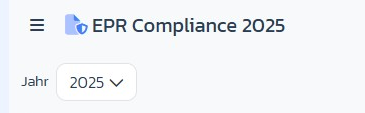
### Year selection
At the top left you select the year. Important: The **previous year's report is only available from January 15** of the following year — Amazon needs at least two weeks until the data is final.
 ### Notice banner
A grey block reminds you that the values come directly from the **EPR reports** provided by Amazon and don't constitute legal or tax advice.
### Notice banner
A grey block reminds you that the values come directly from the **EPR reports** provided by Amazon and don't constitute legal or tax advice.
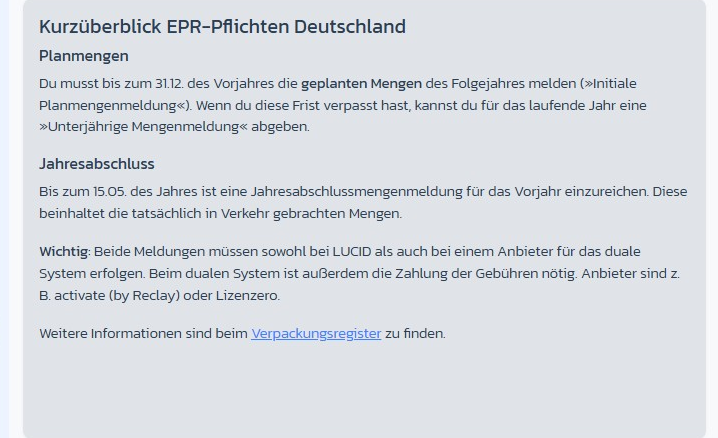
 ### EPR obligations Germany at a glance
A tutorial block is built into the page:
* **Planned quantities**: report the quantities planned for the following year by **December 31 of the previous year** (*Initial planned quantity report*). Missed the deadline? → *Interim quantity report* is possible.
* **Annual closing**: file the *Annual quantity report* for the previous year by **May 15** of the year (quantities actually placed on the market).
* Both reports go to **LUCID** as well as the **dual system** (e.g. activate by Reclay, Lizenzero).
### EPR obligations Germany at a glance
A tutorial block is built into the page:
* **Planned quantities**: report the quantities planned for the following year by **December 31 of the previous year** (*Initial planned quantity report*). Missed the deadline? → *Interim quantity report* is possible.
* **Annual closing**: file the *Annual quantity report* for the previous year by **May 15** of the year (quantities actually placed on the market).
* Both reports go to **LUCID** as well as the **dual system** (e.g. activate by Reclay, Lizenzero).
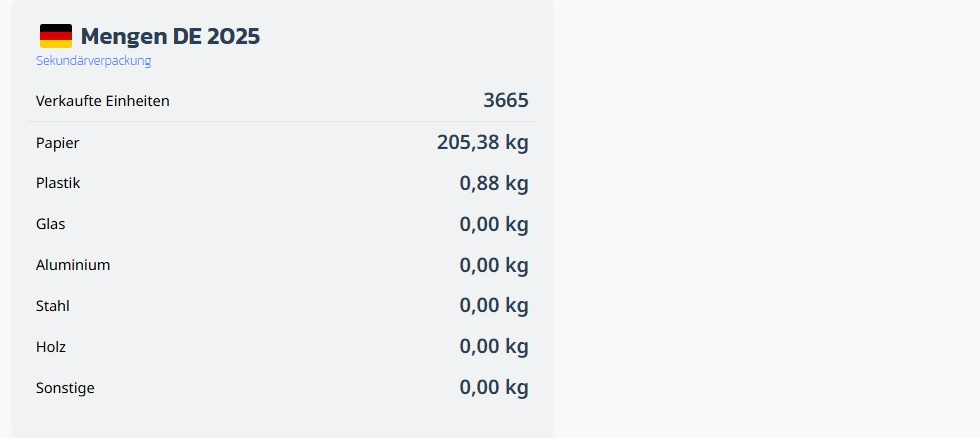
 ### Quantity cards per shipping country
A card showing:
* **Units sold**
* **Paper (kg)**
* **Plastic (kg)**
* **Glass (kg)**
* **Aluminum (kg)**
* **Steel (kg)**
* **Wood (kg)**
* **Other (kg)**
The values cover **secondary packaging** only (i.e. Amazon's shipping packaging, not your product packaging).
### Quantity cards per shipping country
A card showing:
* **Units sold**
* **Paper (kg)**
* **Plastic (kg)**
* **Glass (kg)**
* **Aluminum (kg)**
* **Steel (kg)**
* **Wood (kg)**
* **Other (kg)**
The values cover **secondary packaging** only (i.e. Amazon's shipping packaging, not your product packaging).
 ## Step-by-step: Export quantities for the report
### Step 1: Choose the year
→ Open directly in the app: [app.arbitrageone.de/amazonepr](https://app.arbitrageone.de/amazonepr)
Select the relevant year at the top left (previous year for the annual closing; current year for interim reports).
### Step 2: Check the shipping country
Each card shows the relevant country with a flag. For the German LUCID report, the DE card is the relevant one.
### Step 3: Transfer the values
Copy the values (kg per material) into the reporting portal of your dual system and into LUCID. Watch out for the decimal separator of your portal (comma vs. dot).
## Important notes
* The reported quantities are often smaller than expected — Amazon ships many products without outer packaging or in thin paper bags. That lowers the average.
* These are only the **secondary packaging** (Amazon's shipping packaging). You must estimate and report **primary packaging** (your product packaging) separately.
* If no card exists yet for a year, the notice *"Data is being retrieved shortly."* is shown instead — Amazon delivers the reports with some delay.
## Common issues
**Issue:** "No year is shown."
**Solution:** Either Amazon hasn't generated the reports for your account yet or your SP-API connection isn't picking them up. Check in Seller Central → *Reports → EPR report* whether the data is available there.
**Issue:** "The quantities look too low."
**Solution:** That's normal. Amazon is only responsible for the secondary packaging, not your product packaging. You have to add that separately.
**Issue:** "I can't find the previous year's report in January."
**Solution:** Before January 15 the previous year's report is locked. Wait at least two weeks into the new year, then it'll appear.
## Related articles
* [How do I connect my Amazon account to ArbitrageOne?](../erste-schritte/amazon_konto_verbinden)
## Step-by-step: Export quantities for the report
### Step 1: Choose the year
→ Open directly in the app: [app.arbitrageone.de/amazonepr](https://app.arbitrageone.de/amazonepr)
Select the relevant year at the top left (previous year for the annual closing; current year for interim reports).
### Step 2: Check the shipping country
Each card shows the relevant country with a flag. For the German LUCID report, the DE card is the relevant one.
### Step 3: Transfer the values
Copy the values (kg per material) into the reporting portal of your dual system and into LUCID. Watch out for the decimal separator of your portal (comma vs. dot).
## Important notes
* The reported quantities are often smaller than expected — Amazon ships many products without outer packaging or in thin paper bags. That lowers the average.
* These are only the **secondary packaging** (Amazon's shipping packaging). You must estimate and report **primary packaging** (your product packaging) separately.
* If no card exists yet for a year, the notice *"Data is being retrieved shortly."* is shown instead — Amazon delivers the reports with some delay.
## Common issues
**Issue:** "No year is shown."
**Solution:** Either Amazon hasn't generated the reports for your account yet or your SP-API connection isn't picking them up. Check in Seller Central → *Reports → EPR report* whether the data is available there.
**Issue:** "The quantities look too low."
**Solution:** That's normal. Amazon is only responsible for the secondary packaging, not your product packaging. You have to add that separately.
**Issue:** "I can't find the previous year's report in January."
**Solution:** Before January 15 the previous year's report is locked. Wait at least two weeks into the new year, then it'll appear.
## Related articles
* [How do I connect my Amazon account to ArbitrageOne?](../erste-schritte/amazon_konto_verbinden)